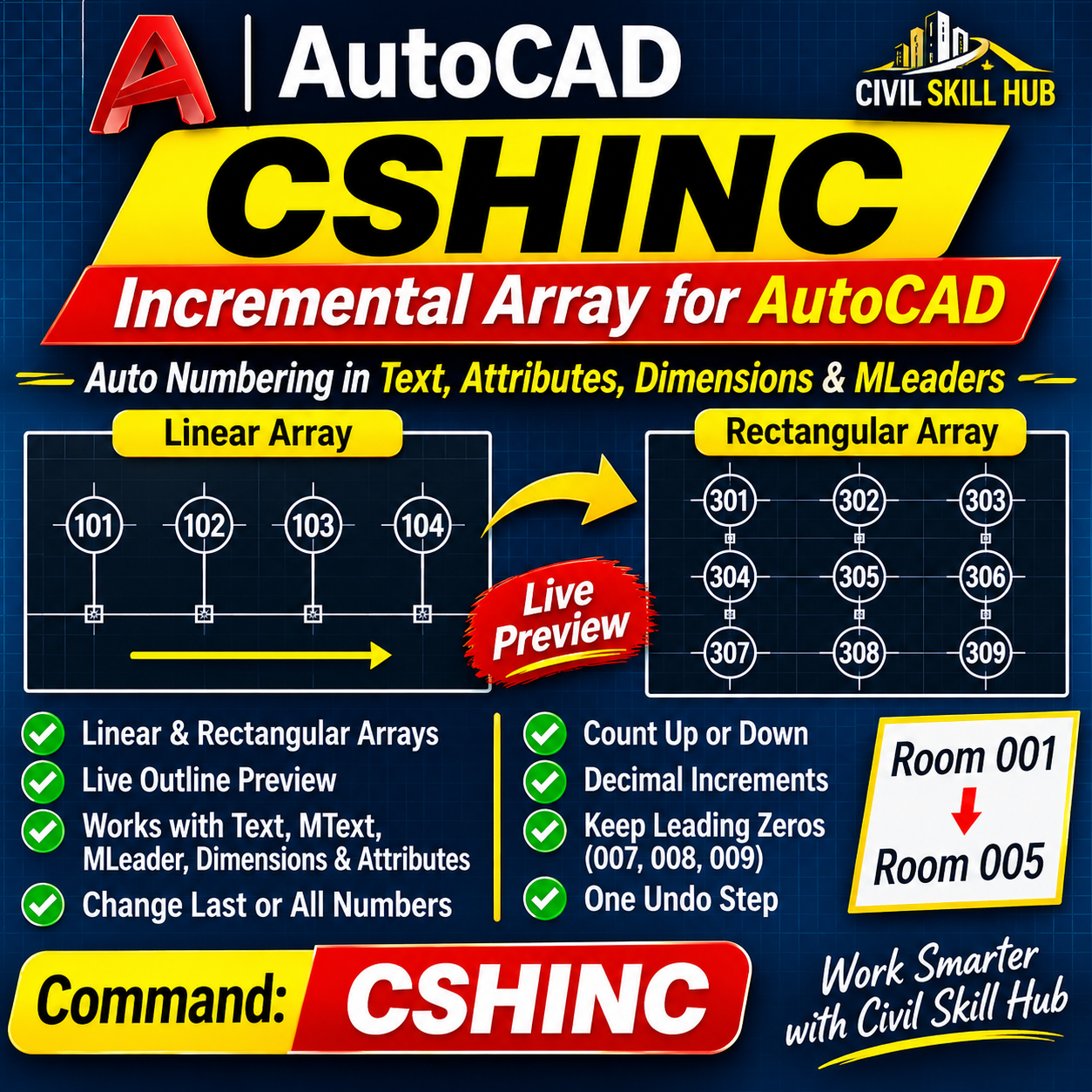
Download CSHINC, a free AutoCAD LISP for incremental array and automatic numbering that lets civil engineers, structural draftsmen, and architects copy objects while incrementing numbers in Text, MText, MLeaders, dimensions, and block attributes with a live preview.
Numbering grid bubbles, structural column marks, pile numbers, parking bays, or room tags manually after using the standard AutoCAD array command takes hours and invites numbering errors. With CSHINC, you simply select your objects, configure the row/column spacing and increment step, and drag your mouse to see a live outline preview—every generated copy automatically gets its next sequential number.
Key Features of This Free AutoCAD LISP for Incremental Array
- Linear & Rectangular Arrays in One Command: Create single-row linear arrays or full multi-row, multi-column rectangular grids from a single unified dialog/workflow.
- Live Interactive Outline Preview: Move your cursor across the drawing to preview the exact array layout, spacing, and direction before placing the copies.
- Works Across All AutoCAD Text Entities: Automatically increments numbers inside standard
Text,MText,MLeadercallouts, dimension override text, and block attributes. - Flexible Number Targeting: Choose whether to increment only the last number in a string (such as
COL-01toCOL-02) or all numbers present in the selected text. - Count Up/Down, Decimals & Leading Zeros: Supports positive or negative increments (counting up or down), decimal steps (e.g.,
0.5,1.25), and preserves leading zeros automatically (007,008,009). - Single-Step Undo: Revert the entire generated array and all incremented labels with a single
UNDOcommand if you want to adjust spacing.
Step-by-Step Guide: How to Use CSHINC in AutoCAD
- Load the LISP File: Open your drawing in AutoCAD for Windows and run the
APPLOADcommand. Browse to your downloadedCSHINCfile and click Load. - Launch the Command: Type
CSHINCin the command line and press Enter. - Select Objects to Array: Select the geometry, block with attributes, text, or MLeader you want to copy and number sequentially.
- Set Increment & Spacing Options: Specify your starting increment step (up, down, or decimal), choose whether to update the last number or all numbers, and set your linear or rectangular spacing.
- Preview & Place: Drag your mouse to inspect the live outline preview and click to generate the complete numbered array instantly.
Why Use a Free AutoCAD LISP for Incremental Array Numbering?
Whether you are laying out foundation piles, structural columns, grid axes, stair risers, or precast panels, traditional copying forces you to double-click and edit every label individually. Using this free AutoCAD LISP for incremental array automation combines array copying and smart sequential numbering into one fast step—keeping your drawings accurate and saving hours of repetitive drafting.
System Requirements & Free License Information
- Supported Software: Full Autodesk AutoCAD for Windows (AutoCAD 2013 through AutoCAD 2026). Note: AutoCAD LT does not support AutoLISP routines.
- Units Compatibility: Works seamlessly in Metric (metres, millimetres) and Imperial (feet, inches) drawings.
- 100% Free License:
CSHINCis completely free for personal, academic, and commercial engineering projects—no license key, trial timer, or activation code is required.
Frequently Asked Questions (FAQ)
Does CSHINC preserve prefixes, suffixes, and leading zeros?
Yes, CSHINC keeps all text prefixes and suffixes intact and automatically preserves leading zeros (for example, turning P-001 into P-002, P-003, and so on).
Can I use CSHINC with attributed blocks like grid bubbles or column tags?
Yes, CSHINC reads and increments numeric values inside block attributes as well as regular Text, MText, MLeaders, and dimension overrides.
Developed by Civil Skill Hub – Ubaid Qazi. Watch step-by-step AutoCAD tutorials on Civil Skill Hub YouTube Channel or explore more AutoCAD LISP Tools on our store.