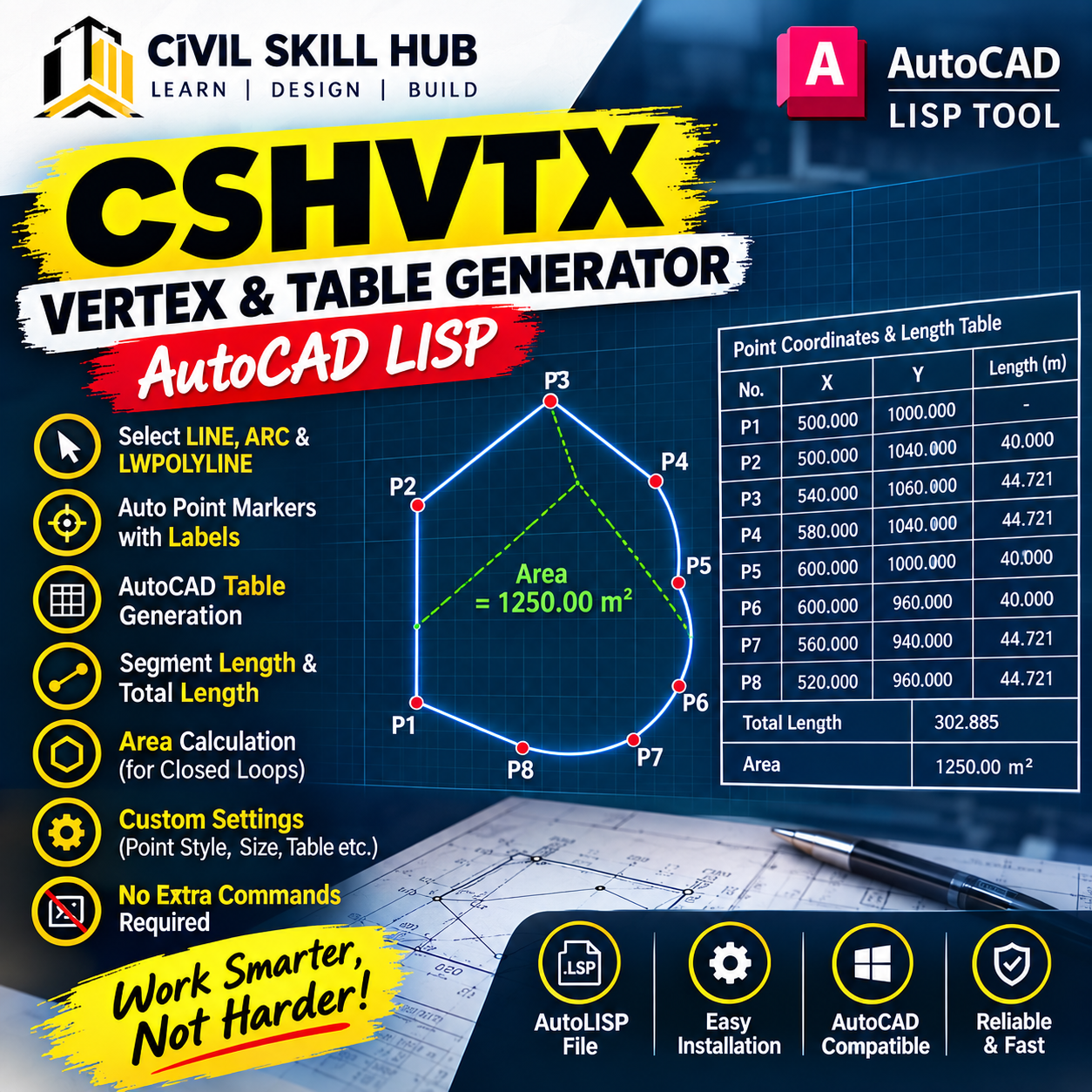
Save hours when working with survey plans, site layouts, road alignments, and irregular land boundaries. CSHVTX is a fast, automated AutoCAD LISP for vertex table generation developed by Civil Skill Hub – Ubaid Qazi. Simply select your LINE, ARC, and LWPOLYLINE objects, configure your point and table preferences in a built-in dialog box, and CSHVTX places numbered vertex markers (P1, P2, P3...) on your drawing while generating a clean native AutoCAD table with coordinates, segment lengths, total length, and loop area.
Key Features of This AutoCAD LISP for Vertex Table Generation
- Multi-Entity Selection: Works seamlessly across selected
LINE,ARC, andLWPOLYLINEobjects—including curved arcs and polyline bulge segments. - Smart Shared-Vertex Detection: Automatically identifies vertices and shared endpoints without creating duplicate point numbers where lines or arcs meet.
- Outward-Positioned Numbered Labels: Places native AutoCAD
POINTmarkers and automatically positionsPnlabels (P1, P2...) neatly outward from your geometry so text never overlaps your lines. - True Curved Segment Lengths: Calculates exact arc and polyline bulge lengths rather than straight chord approximations.
- Automatic Native AutoCAD Table: Builds a clean, plot-ready AutoCAD
TABLElisting Point/Coordinate Number, X Coordinate (Easting), Y Coordinate (Northing), and Segment Length. - Total Length & Closed-Loop Area: Automatically sums total segment length and calculates enclosed area whenever closed boundary loops are detected.
- Built-In Settings Dialog (No DDPTYPE Needed): Control Point Style, Point Size, Label Height, Table Row Height, and Table Column Width directly inside the dialog—works independently without requiring
DDPTYPEor external commands.
How to Use CSHVTX in AutoCAD
- Load the Routine: Open your drawing in AutoCAD for Windows and run the
APPLOADcommand to loadCSHVTX. - Launch the Command: Type
CSHVTXin the command line and press Enter. - Select Geometry: Select your
LINE,ARC, orLWPOLYLINEobjects on the drawing. - Configure Point & Table Settings: Set your preferred point style, point size, label height, table row height, and column width in the dialog box.
- Place Table: Click an insertion point—
CSHVTXplaces all numbered vertex markers outward and generates your complete coordinate and length table instantly.
Why Choose CSHVTX as Your AutoCAD LISP for Vertex Table Drafting?
Extracting vertex coordinates and curved segment lengths manually from multi-segment site plans or irregular boundaries is slow and prone to human error. Using this AutoCAD LISP for vertex table automation prevents duplicate vertex numbering and keeps labels clear of your linework—making CSHVTX the fastest AutoCAD LISP for vertex table and survey schedule tool for civil engineers, land surveyors, and CAD draftsmen.
Who Is CSHVTX Useful For?
- Land Surveying & Boundary Mapping Plans
- Site Plans, Plot Layouts & Irregular Land Work
- Road Alignments & Corridor Segment Schedules
- Quantity Takeoff, Length Measurement & Civil Engineering Drawings
Requirements & License Information
- Software Compatibility: Full Autodesk AutoCAD for Windows and compatible CAD environments with AutoLISP support (AutoCAD LT is not supported).
- Support & Activation: For license activation or technical assistance, contact info@civilskillhub.com.
Frequently Asked Questions (FAQ)
Does CSHVTX create duplicate points where two lines or polylines meet?
No, this AutoCAD LISP for vertex table extraction detects shared endpoints automatically and assigns a single unique point number to each shared vertex.
Can CSHVTX calculate the true length of curved arcs and polyline bulges?
Yes, CSHVTX detects both standalone ARC entities and curved LWPOLYLINE bulge segments, calculating their true arc length and adding them to the total length and closed-loop area.
Developed by Civil Skill Hub – Ubaid Qazi. Watch tutorials on Civil Skill Hub YouTube Channel or explore more AutoCAD LISP Tools on our store.